



Featured Work
- UX/UI Development
- Web Engineering
- Enterprise Systems


This page highlights a collection of enterprise-grade projects built across Elgin Community College, Mayo Clinic College, and independent client work. These include full website redesigns, custom TerminalFour components, data integrations, accessibility remediation, security messaging systems, and cross-platform applications. Each card represents a real-world problem I solved through design, development, or systems engineering.
Featured Work Experience
ECC – Enterprise Projects
Major enterprise systems, websites, integrations, and component development work completed at Elgin Community College.
ECC Main Website Internal Redesign
Bootstrap 5 • Front-End Dev • T4 Development
Led the redesign of the internal pages across Elgin.edu (excluding the homepage), moving them to a modern Bootstrap 5 framework. Refactored legacy code, streamlined content management in TerminalFour, and improved accessibility and technical SEO.
Key Highlights
- Developed new internal page templates in a local environment
- Created and refined T4 content types and page layouts
- Removed and merged duplicate/unused layouts for easier maintenance
- Optimized JavaScript, performance, and accessibility site-wide
Bootstrap 5
TerminalFour
Accessibility
Technical SEO
ECC Foundation Website Redesign
UX/UI Design • Front-End Dev • T4 Development
Redesigned and rebuilt the ECC Foundation website with a modern, accessible layout. Designed the UI in Adobe XD and developed the full site locally before migrating it into TerminalFour.
Key Highlights
- Built dynamic scripts to automate Foundation content
- Created T4 layouts + content types
- Fully responsive with WCAG improvements
- Performance optimized with Lighthouse
UX Design
TerminalFour
Accessibility
Performance Optimization
ECC Celebrate 75 Website
UX/UI Design • Front-End Dev • T4 Development
Designed and developed a dedicated anniversary website to celebrate ECC's 75th year. Built the entire site locally with dynamic, automated content and migrated it to TerminalFour with optimized layouts and accessibility.
Key Highlights
- Developed full UX/UI and custom front-end
- Automated data population across pages
- Created T4 layouts + content types
- WCAG accessibility + Lighthouse performance optimization
UX Design
TerminalFour
Accessibility
Performance Optimization
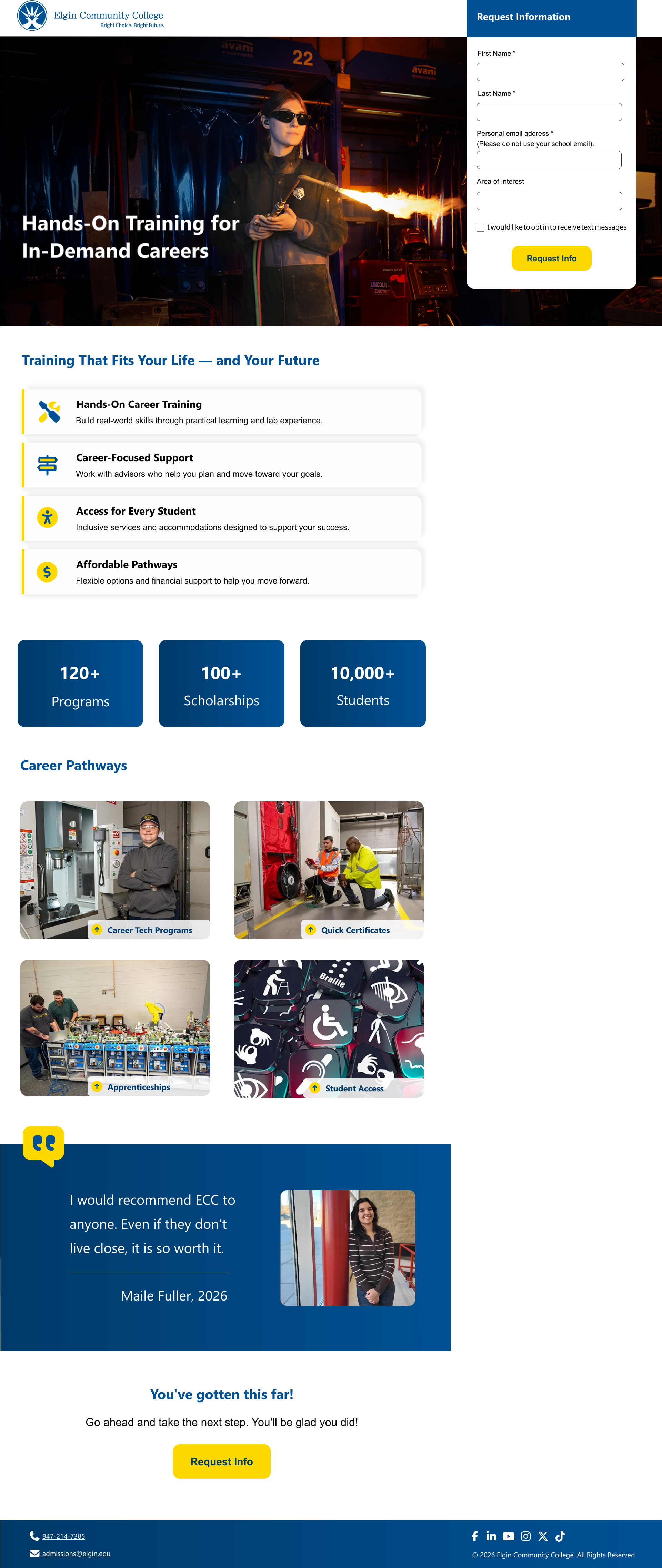
PPC Microsite Templates
UX/UI • Front-End Development • Conversion Optimization
Took ECC’s PPC microsite template from ideation through implementation, creating a fast, conversion-focused experience designed to drive prospective students toward completing a program-specific Request for Information (RFI) form.
Key Highlights
- Designed and developed the PPC microsite framework from initial concept through implementation
- Created a streamlined, performance-focused experience for paid campaign traffic
- Implemented a sticky Formstack RFI to keep the primary conversion action easily accessible
- Optimized JavaScript loading so pages only load functionality needed for the microsite experience
- Built the template as a reusable framework now supporting multiple ECC program campaigns
UX/UI
JavaScript
Performance
Conversion Optimization
Make It in the IL Microsite
Microsite Design • Bootstrap 3 → 5 • Campaign Site
Built the original Make It in the IL campaign microsite in Bootstrap 3 and later migrated it to ECC’s Bootstrap 5 microsite template, enhancing usability, layout, and campaign branding.
Key Highlights
- Developed the original campaign microsite using ECC’s earlier template
- Migrated the site to the new Bootstrap 5 microsite framework
- Implemented sticky auxiliary navigation to keep Apply Now links visible
- Adjusted Back to Top placement to avoid conflict with chat UI
- Integrated Make It IL campaign colors and branding into the new template
Bootstrap 5
Microsite
UX/UI
Branding
ECC Arts Center Website
API Integration • Front-End Dev • T4 Development
Contributed to the development of a standalone website for the ECC Arts Center to improve ticket sales and marketing impact. Built dynamic components powered by the Spektrix API, created T4 layouts, and optimized performance across the site.
Key Highlights
- Developed site components (navigation, footer, events sections) in Dreamweaver
- Integrated Spektrix API to automate event listings across pages
- Implemented event sorting and category-based filtering
- Created T4 content types + page layouts and resolved bugs
- Optimized performance using PageSpeed/Lighthouse
PHP
Spektrix API
TerminalFour
Dynamic Data
Performance Optimization
T4 Calendar Module Implementation
TerminalFour • Blade/PHP • Vendor Data Integration
Implemented the enterprise Calendar module for Mayo Clinic College and Elgin Community College. Used TerminalFour’s starter Blade files and content-type exports as a foundation, then built out the full functionality—including layouts, filtering logic, and accessible frontend components. At ECC, engineered custom vendor integrations that convert external event feeds into XML synced directly into the main calendar.
Key Highlights
- Extended T4’s starter Blade templates into a complete, fully functional calendar component
- Mayo Clinic College: Implemented calendar layouts, filtering logic, category structures, responsive markup, and WCAG-compliant patterns based on supplied designs
- ECC Vendor Integrations:
- Converted Spektrix JSON event data into XML using PHP for Arts Center events
- Converted PrestoSports RSS feeds into XML for Athletics events
- Synchronized both XML sources with the T4 Calendar to auto-populate the ECC event system
- Built and structured T4 content types for events, categories, filters, and full details
- Developed reusable, accessible HTML/CSS components matching enterprise brand requirements
- Adapted the calendar system to function in two completely different institutions (ECC + Mayo)
TerminalFour
Blade/PHP
XML Pipelines
Vendor Integrations
ECC Digital Campus Map Overhaul
JavaScript Dev • Data Integration • T4 Content Modeling
Redesigned ECC’s digital campus map into an accessible, data-driven system with real-time updates, custom search, and a fully editable T4 content type. Delivered a modernized and inclusive map experience used across all ECC sites.
Key Highlights
- Added accessible POIs (ramps, elevators, restrooms, ALS devices, emergency buttons)
- Built a new T4 Campus Map content type using Handlebars for non-developer editing
- Integrated Google Sheets with real-time syncing for instant data updates
- Developed custom map search tailored to ECC locations
- Modernized all JS, replacing deprecated methods
View District 509 Map
JavaScript
TerminalFour
Data Automation
Accessibility
ECC CDN/PXL Performance Optimization
Performance Optimization • CDN Integration • SEO Impact
Implemented CDN/PXL across ECC’s websites to optimize image and document delivery, dramatically improving load times, mobile performance, and organic search visibility.
Key Highlights
- Migrated image and document handling to CDN/PXL across content type layouts
- Optimized WebP/JPEG delivery for faster load times
- Reduced homepage load time from 13.4s → 7.7s (42% improvement)
- Improved organic search by 31.56% and sessions by 27.76%
Performance Optimization
CDN/PXL
WebP/JPEG Optimization
SEO Improvement
ECC Page Search System
T4 Programmable Layouts • XML Pipelines • JavaScript Filtering
Engineered a unified, flexible search system used across ECC sites to filter Cards, Accordions, Media Library items, Navigation Objects, and XML-driven datasets. Built scalable T4 programmable layouts and search logic that significantly improved content discoverability on data-heavy pages.
Key Highlights
- Unified 9 different search patterns (Cards, Accordions, Lists, Files, Forms, XML)
- Invented “File Search with Category XML” to solve Media Library limitations
- Built a flexible Page Search content type supporting multiple content structures
- Created Tab Search + Forms/Files XML with programmable layouts
- Consolidated Documents + Forms into a single streamlined Files system
- Improved UX on content-heavy pages by making results easier to filter
TerminalFour
Programmable Layouts
Java
XML
JavaScript
ECC Intranet Search Optimization
Funnelback • Search Optimization • XML Indexing
Enhanced the Funnelback-powered search on ECC’s employee intranet by implementing structured filters, autocomplete, new search collections, and custom data crawling. Delivered a significantly more accurate and user-friendly search experience.
Key Highlights
- Added faceted navigation with category filters (Directory, Documents, Forms, Procedures)
- Implemented structured autocomplete for smarter query suggestions
- Built XML crawlers to index media library documents and employee directory data
- Implemented sort mode switcher for better result control
- Tested extensively across browsers, devices, and employee workflows
Funnelback Search
Java
Freemarker
XML Indexing
Document Content Type – Procedures
T4 Content Type • Accessibility • JavaScript Export
Replaced the old PDF-based procedures system with a structured Document content type that generates searchable, accessible full-text pages for procedures on both elgin.edu and my.elgin.edu.
Key Highlights
- Built a Procedures content type that outputs both index and full-text pages
- Added Print, Download Word, and Close controls to each procedure page
- Used
html-docx-jsandFileSaver.jsto generate accessible Word downloads with working internal links - Implemented search with category filters to help users quickly find procedures
- Improved accessibility by reducing reliance on manually remediated PDFs
View Procedures on Elgin.edu
TerminalFour
Accessibility
JavaScript
Data Tables – Google Sheets Integration
Google Sheets API • Data Tables • JavaScript Integration
Modernized the Data Tables content type by replacing manual CSV uploads with a live Google Sheets integration, allowing contributors to manage table data in Sheets and have it update in real time on elgin.edu and my.elgin.edu.
Key Highlights
- Replaced the CSV download/upload workflow with a Google Sheets URL field
- Used JavaScript to fetch and render data directly from Google Sheets
- Added CSV/Excel export options for users viewing the tables
- Improved data accuracy and reduced contributor workload
View Simple Example
Google Sheets
JavaScript
Data Integration
Contributor Experience
Calendar Widget with Forms
UI Component • Forms UX • JavaScript
Rebuilt the Calendar Widget content type for information-session pages so it works out of the box without page-level JavaScript, using a compact layout and a form-integrated modal experience.
Key Highlights
- Replaced scroll-to-form behavior with a modal that loads a specific jotform with pre-filled data
- Limited initial render to 5 events with a “Load More Events” pattern and count display
- Displayed key event details (date/time, location, room) with a clear CTA for each date
- Centralized all behavior inside the content type for easy reuse across pages
JavaScript
UX/UI
Forms
Content Types
Salesforce Experience Builder Integration
Salesforce • Content Integration • Branding
Styled Salesforce Experience Builder pages to match ECC’s visual branding and built an integration with TerminalFour so selected content is automatically pulled into Salesforce without duplicating effort.
Key Highlights
- Customized Experience Builder pages for consistent ECC look and feel
- Integrated T4 content so existing blocks and sections can be reused in Salesforce
- Reduced redundant content entry and ongoing maintenance
- Improved cohesion between ECC’s web and Salesforce experiences
Salesforce
TerminalFour
Integration
Branding
Salesforce Live Agent Chat Integration
Salesforce Live Agent • T4 Integration • Widget Design
Rebuilt ECC’s Live Agent chat implementation by moving messy page-level code into a dedicated content type layout, creating a scalable chat widget that contributors can enable with a simple dropdown selection.
Key Highlights
- Replaced custom HTML/JS on each page with a centralized chat content type layout
- Built a Chat Widget option in the section’s General tab (e.g., “Admissions”)
- Designed the system to support multiple future chat configurations without extra dev work
- Improved maintainability and ensured consistent branding and UX
Salesforce
TerminalFour
Widget Design
Salesforce Marketing Cloud Email Templates
Email Design • SFMC • Responsive HTML Email
Designed and developed reusable email templates in Salesforce Marketing Cloud that align with ECC branding, render consistently across major email clients, and remain accessible and responsive on different devices.
Key Highlights
- Built three reusable email templates for ECC campaigns and communications
- Collaborated with Digital Marketing to gather requirements and refine layouts
- Ensured responsive behavior and consistent rendering across clients
- Incorporated accessibility best practices into email structure and content
Salesforce Marketing Cloud
Responsive Email
Accessibility
Branding
Mayo Clinic College – Enterprise Work
Accessibility remediation, security messaging, and component implementations delivered within a highly regulated healthcare environment.
Mayo Clinic College Accessibility Remediation
WCAG 2.1 AA • Siteimprove • T4 Component Fixes
Improved accessibility across Mayo Clinic Education sites by auditing and correcting component-level issues within TerminalFour layouts. Raised overall Siteimprove score from 76% to 91% through targeted remediation, consistent markup fixes, and accessibility-first adjustments.
Key Highlights
- Corrected improper heading structure in hero and tile components
- Converted decorative images to use empty
alttext andaria-hiddenwhere appropriate - Fixed inaccessible tile patterns across multiple content types
- Ensured all components followed WCAG 2.1 AA standards for contrast, hierarchy, and semantics
- Standardized markup across reused components to prevent recurring violations
- Collaborated with content owners to clarify accessibility issues and implement fixes safely
WCAG 2.1 AA
Siteimprove
TerminalFour
Accessibility Remediation
Mayo Clinic College – Ransomware Alert Banner
Incident Communication • T4 Development • Accessibility
Implemented the enterprise-wide ransomware alert banner for Mayo Clinic College based on provided design specifications. Developed the component inside TerminalFour with fully accessible markup, responsive behavior, and secure messaging logic for incident-related communication.
Key Highlights
- Built a reusable T4 content type for rapid deployment of security alerts
- Translated provided design into accessible, responsive HTML and CSS
- Engineered safe display logic for incident messaging across high-traffic pages
- Ensured WCAG 2.1 AA compliance, including contrast and screen reader behavior
- Prepared, tested, and validated the banner for production rollout
Incident Communication
TerminalFour
Accessibility
Security UI
Independent Projects
Standalone desktop applications and tools built with Electron and JavaScript to solve real workflow problems for clients.
Survey Analyzer Application
Cross-Platform App • Electron • JavaScript
Built a custom cross-platform analyzer application to streamline survey data processing. Improved analysis speed by 67%, enabling faster reporting and significantly reducing manual workload for the client.
Key Highlights
- Developed a desktop application using Electron, HTML/CSS, and JavaScript
- Designed a maintainable code architecture with modular components
- Automated repetitive analysis tasks to improve efficiency
- Delivered a polished UI with simple, clear workflows for non-technical users
Electron
JavaScript
App Development
Process Automation
Transcript Generator
Electron App • Automation • Data Processing
Built a cross-platform Electron desktop application that automates transcript generation for an online school. Replaced a slow, manual, Word-based process with an instant, accurate system that reads curriculum data, calculates credit hours and GPA, and exports a ready-to-use transcript file.
Key Highlights
- Designed and developed a desktop app using Electron, HTML/CSS, and JavaScript
- Automated transcript math (GPA, credit hours, course totals)
- Imported curriculum and student data from JSON
- Reduced manual work and eliminated calculation errors
- Added export/download functionality for staff-ready transcripts
- Delivered a simple, clean UI for non-technical staff
Electron
JavaScript
Automation
JSON
Design Gallery
A visual snapshot of selected UI designs, page layouts, and component work across ECC, Mayo Clinic College, and personal projects. Screenshots are grouped by product, not by pixel-perfect size.
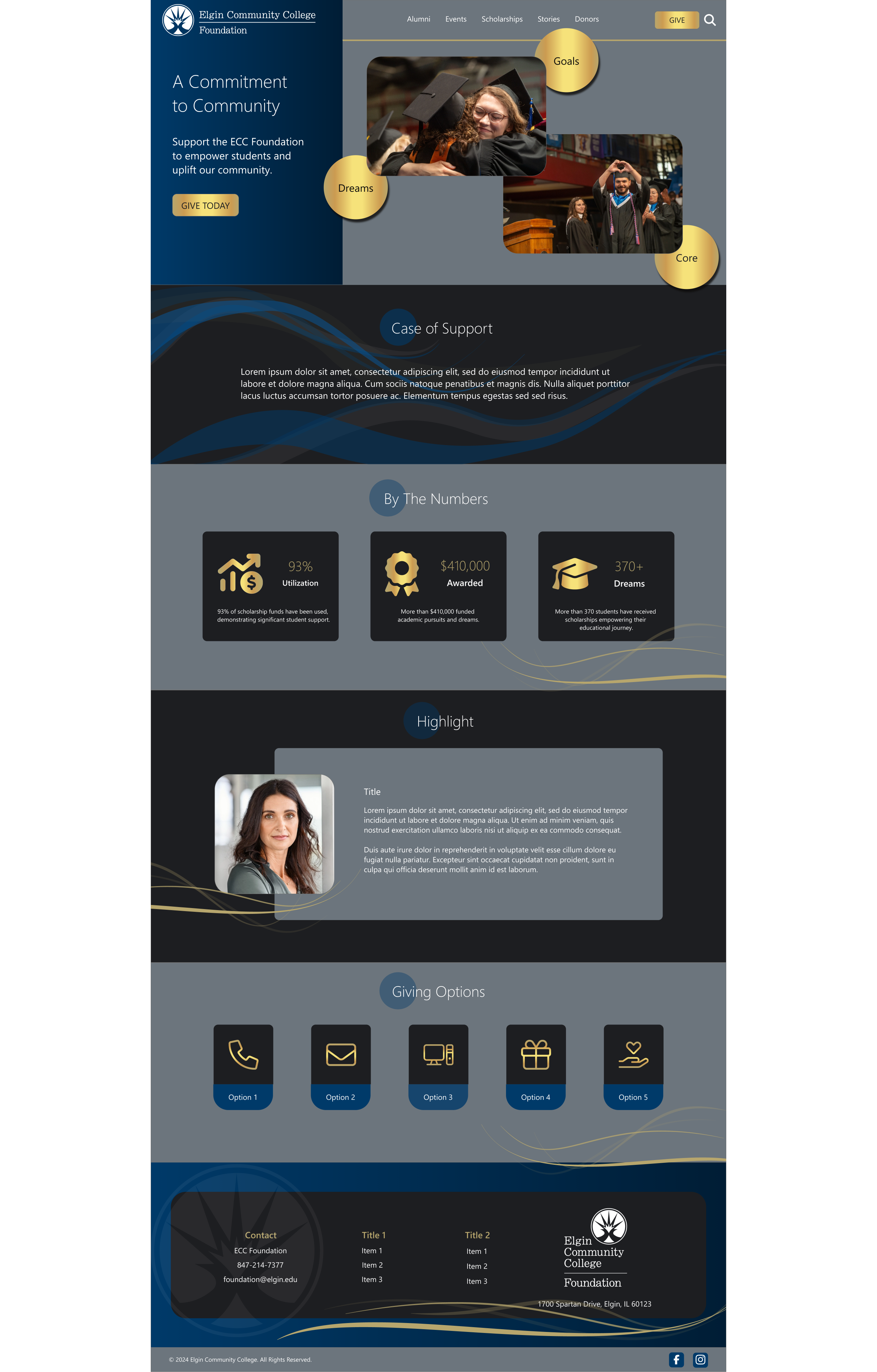
ECC Foundation – Homepage UI
Hi-fi Adobe XD design • Desktop layout
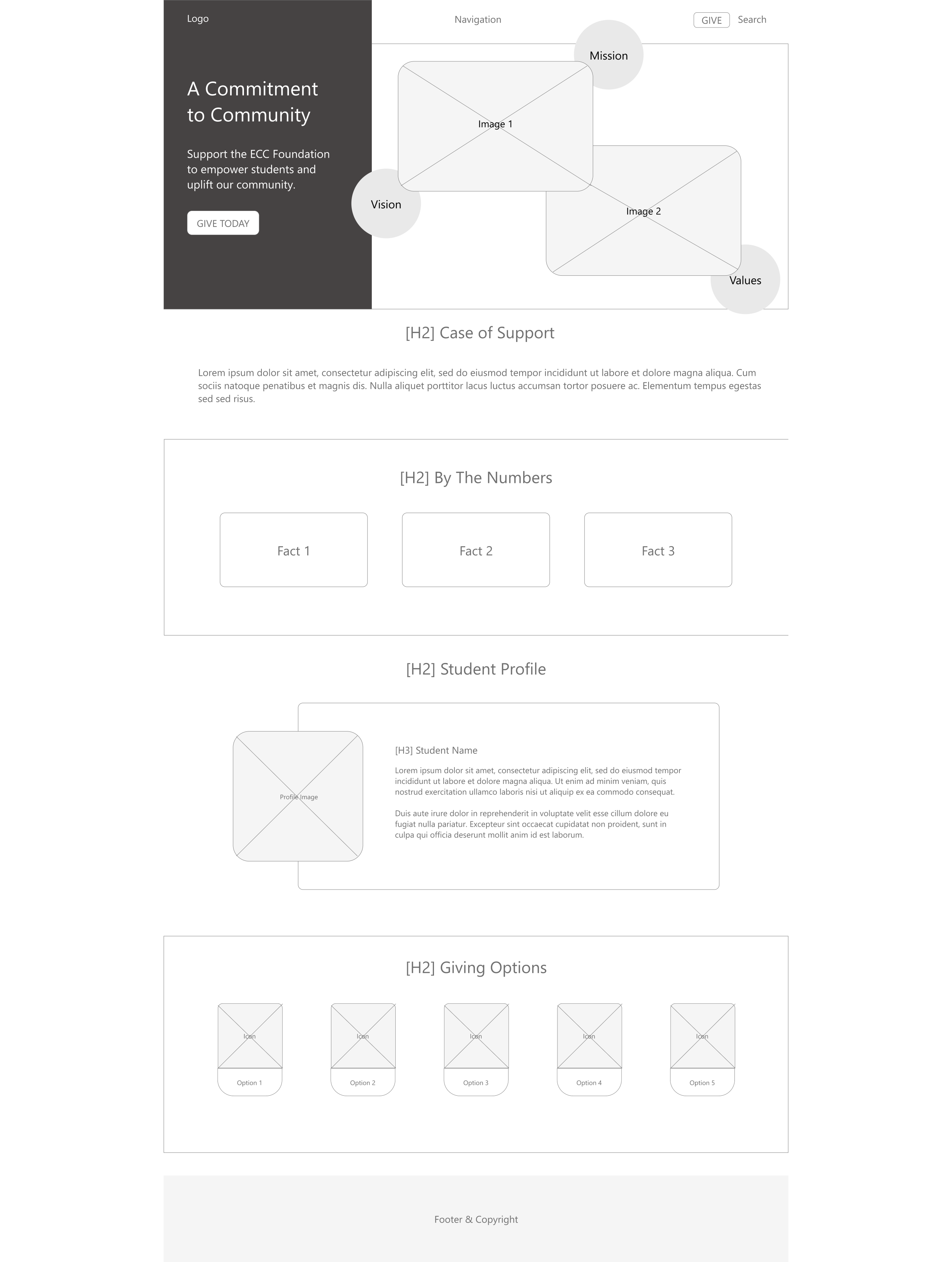
ECC Foundation – Wireframe
Lo-fi UX wireframe • Content structure
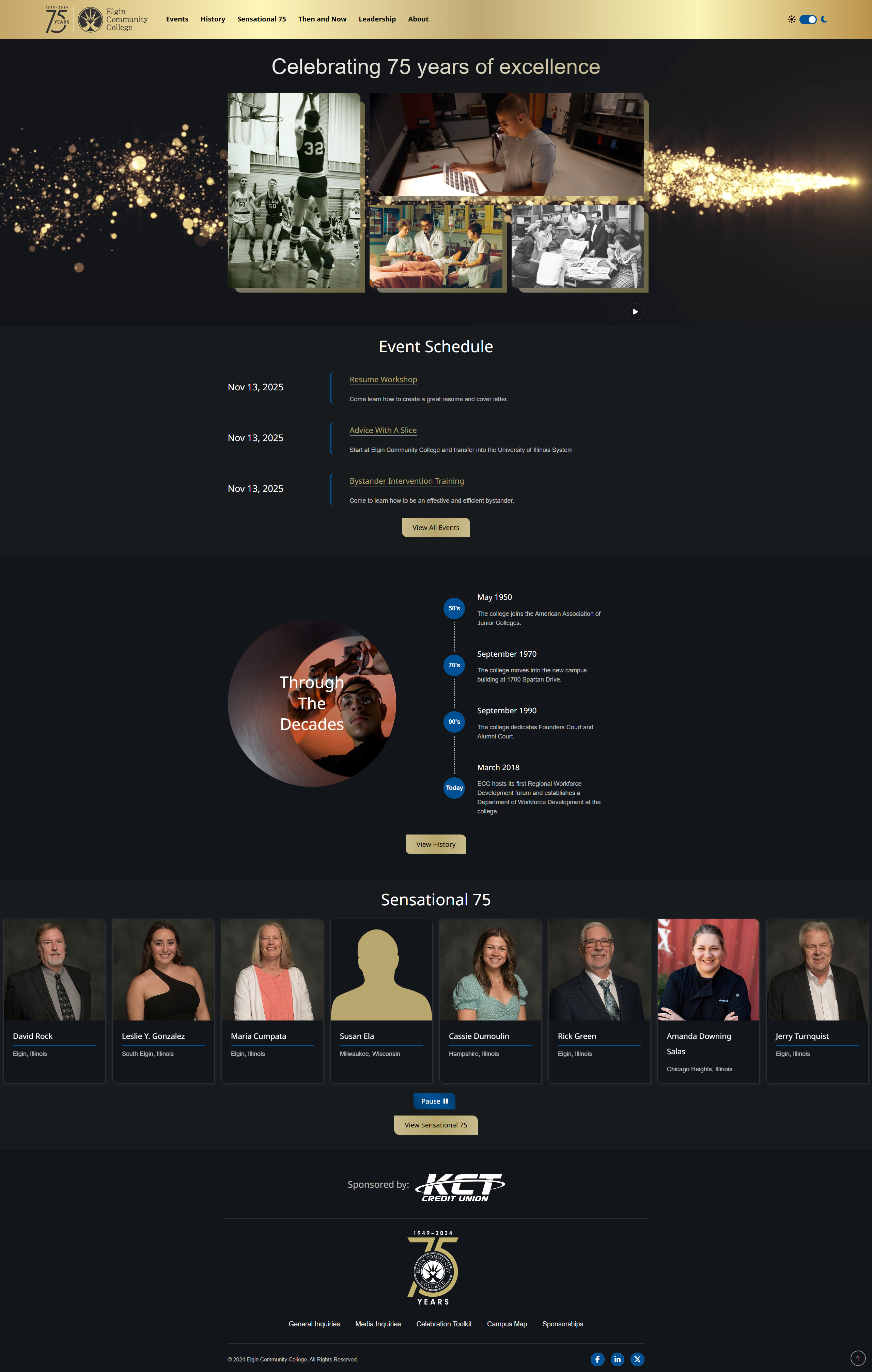
ECC Celebrate 75 – Dark Theme
Events, timeline, and featured profiles
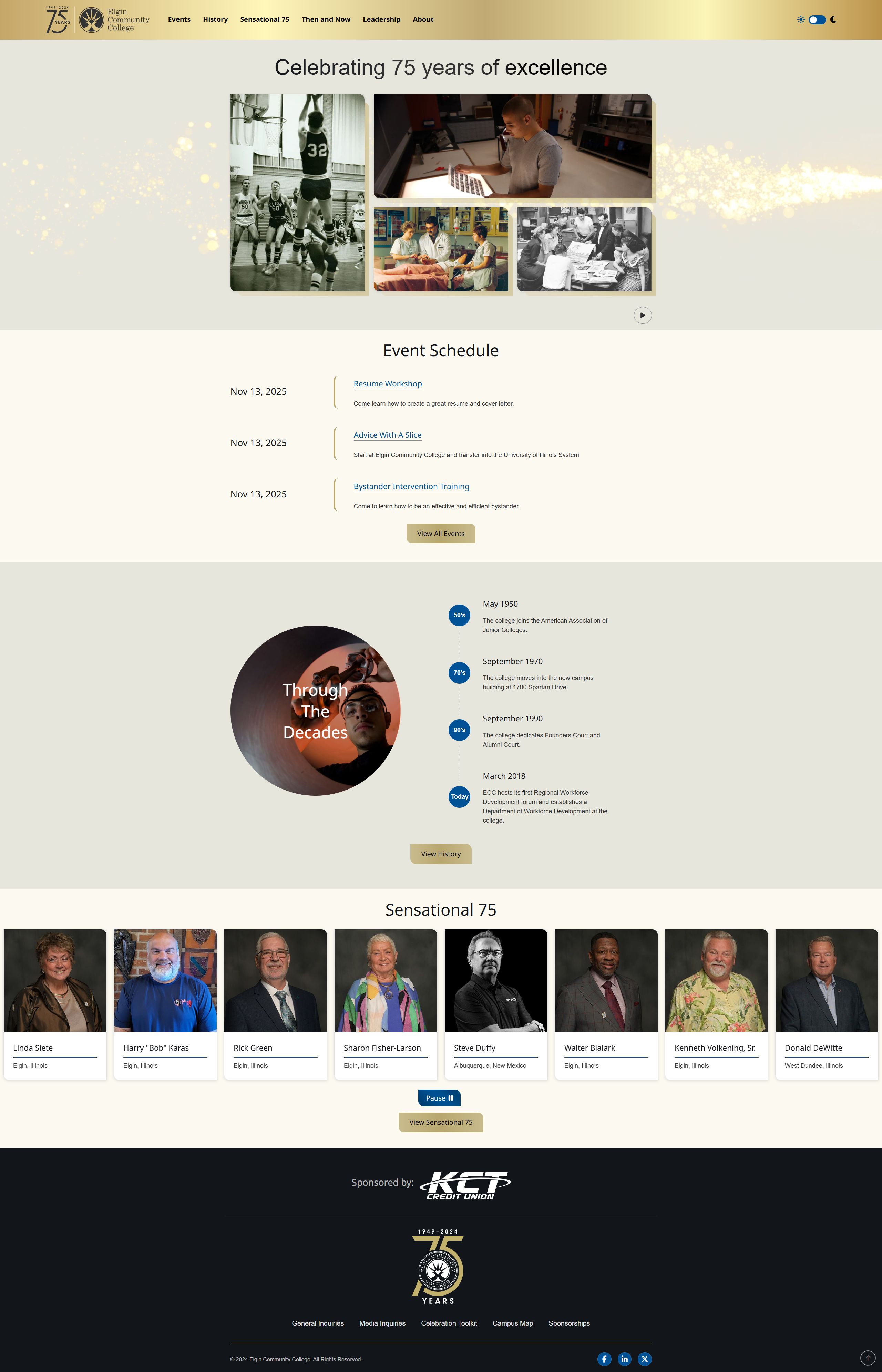
ECC Celebrate 75 – Light Theme
Alternative UI variant • Light color system
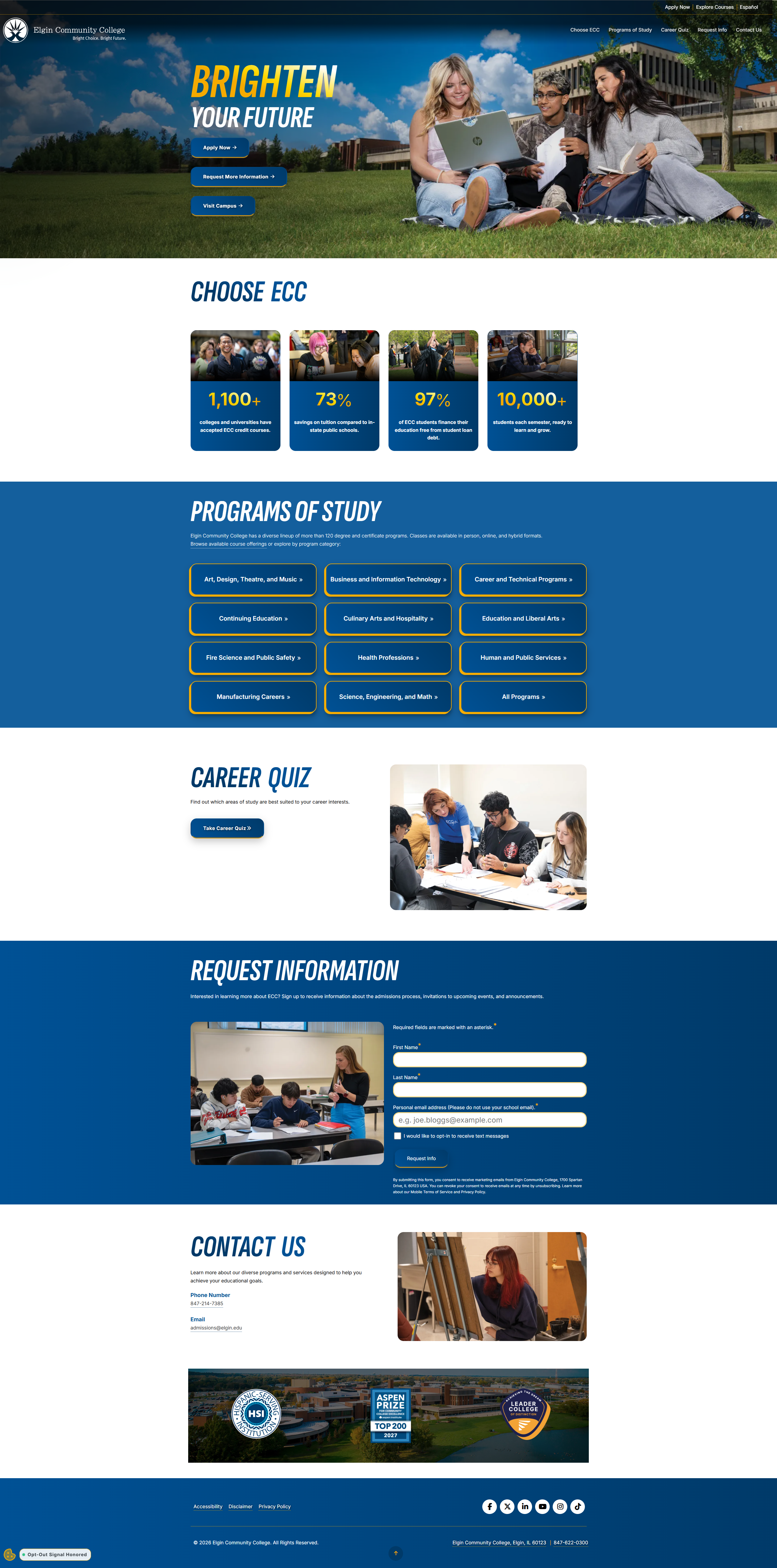
Summer 2026 Campaign
Microsite UI • Program pathways & stories
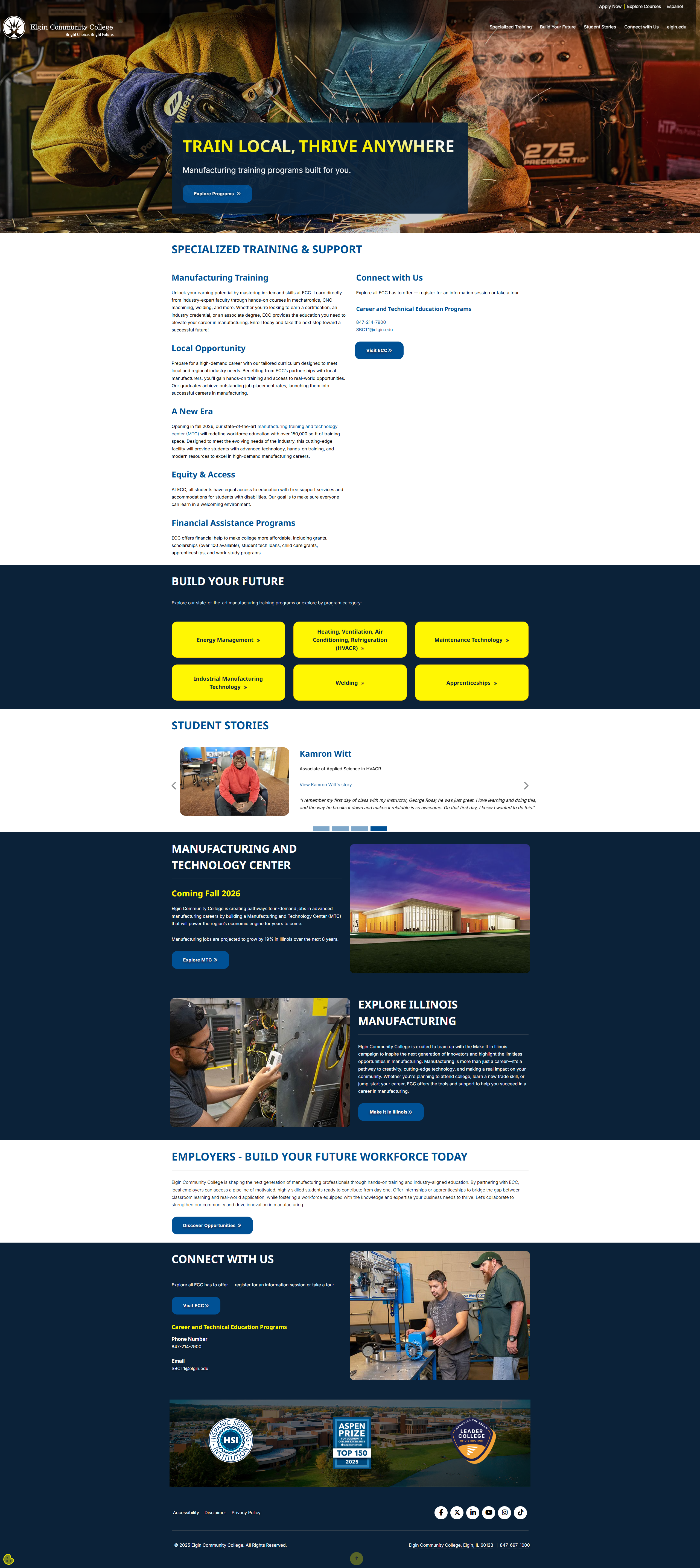
Make It IL Microsite
Microsite UI • Program pathways & stories
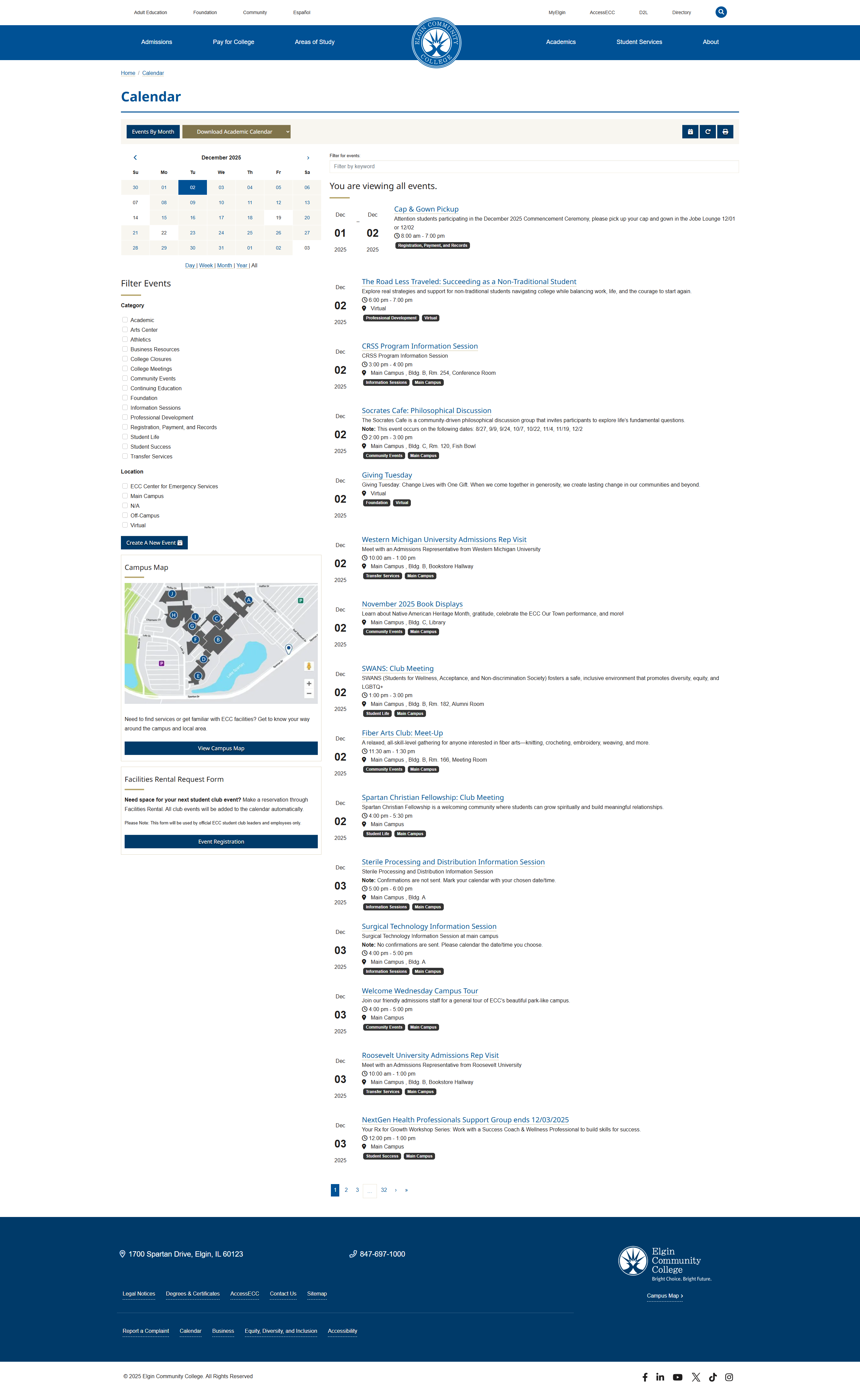
ECC Calendar
UX/UI for full calendar view • Filters & campus map
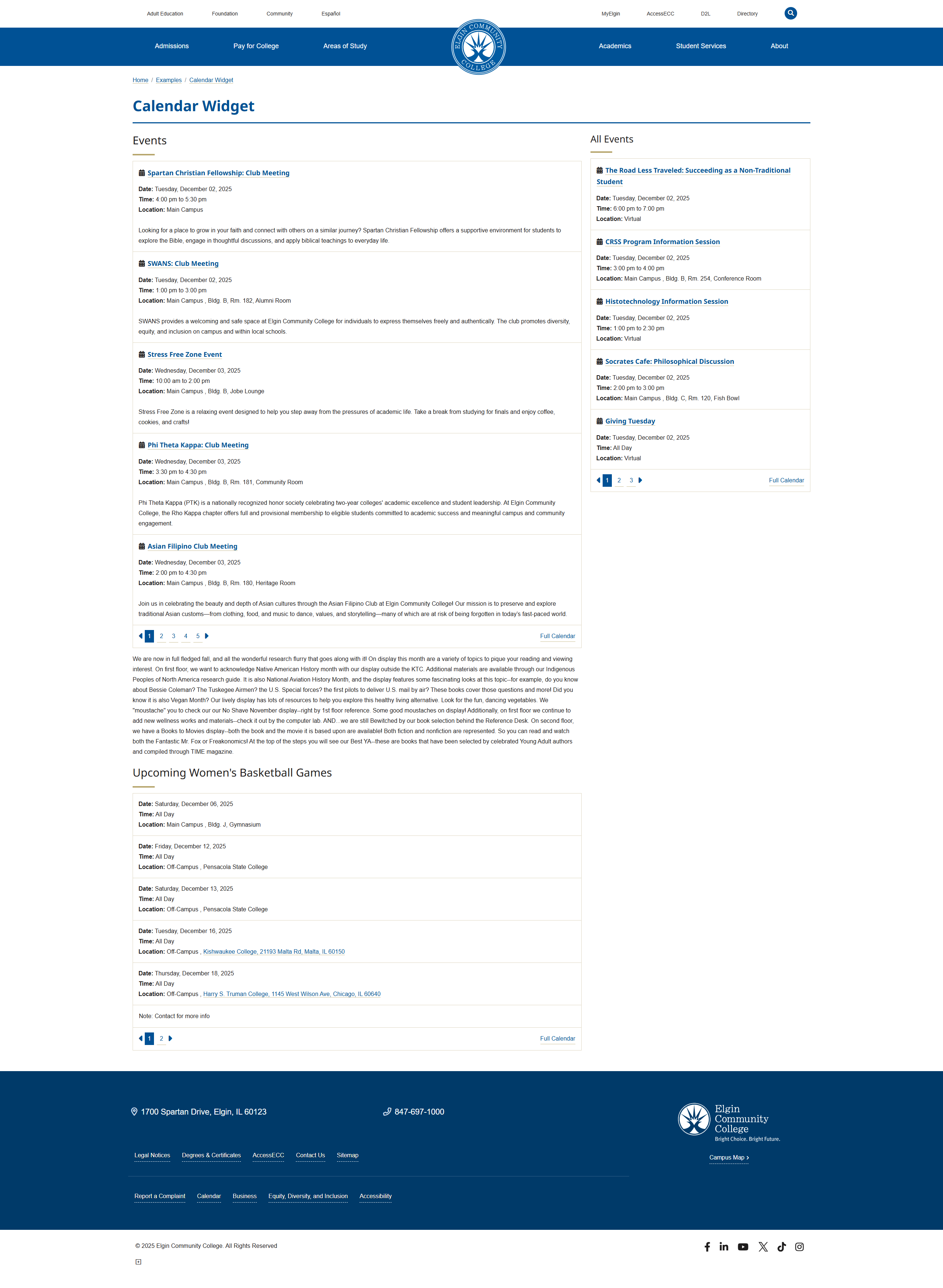
ECC Calendar Widget
Embedded calendar UI • Widget layout & event cards
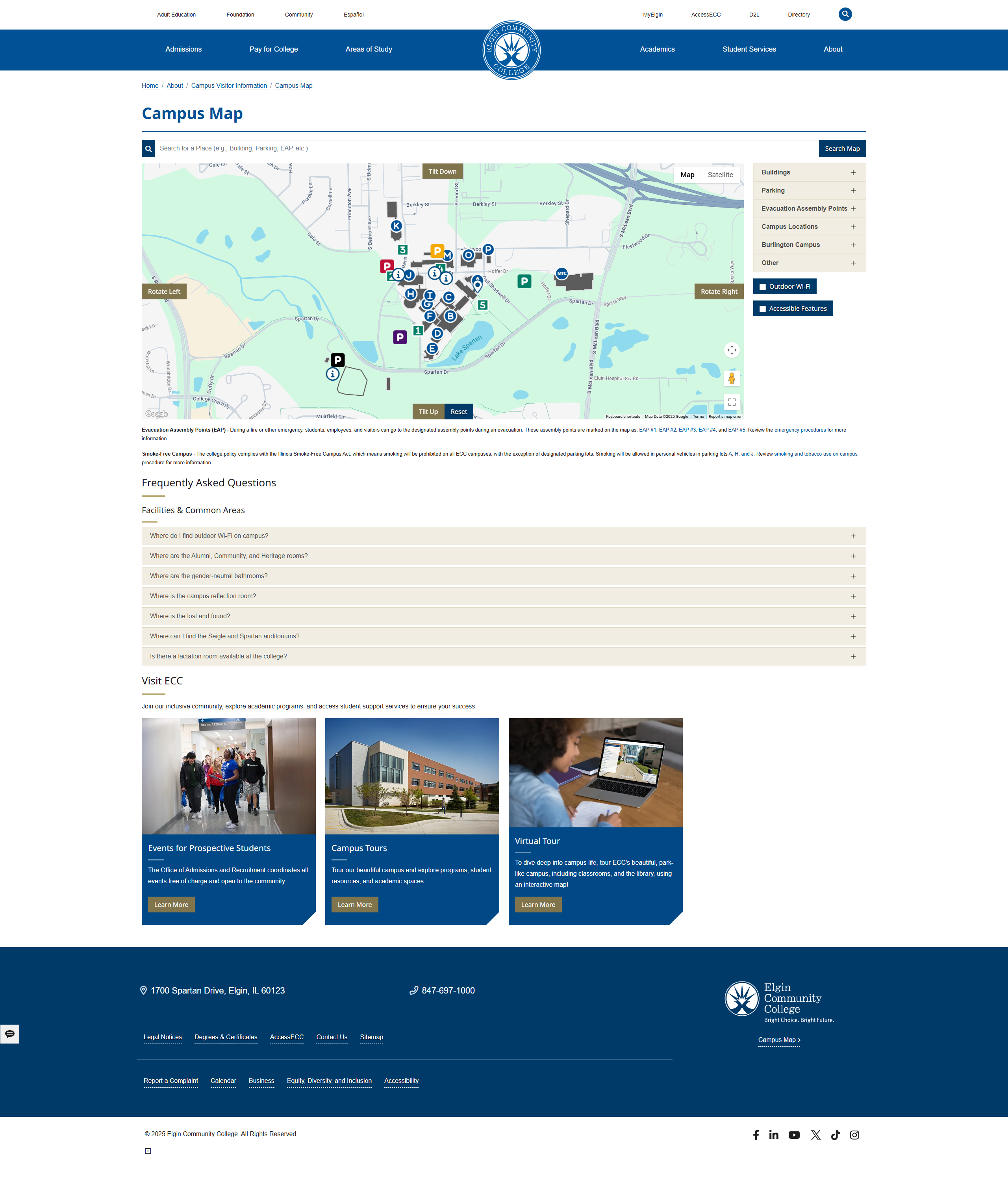
ECC Campus Map – Accessible UI
Campus map layout • Accessible filters & FAQs
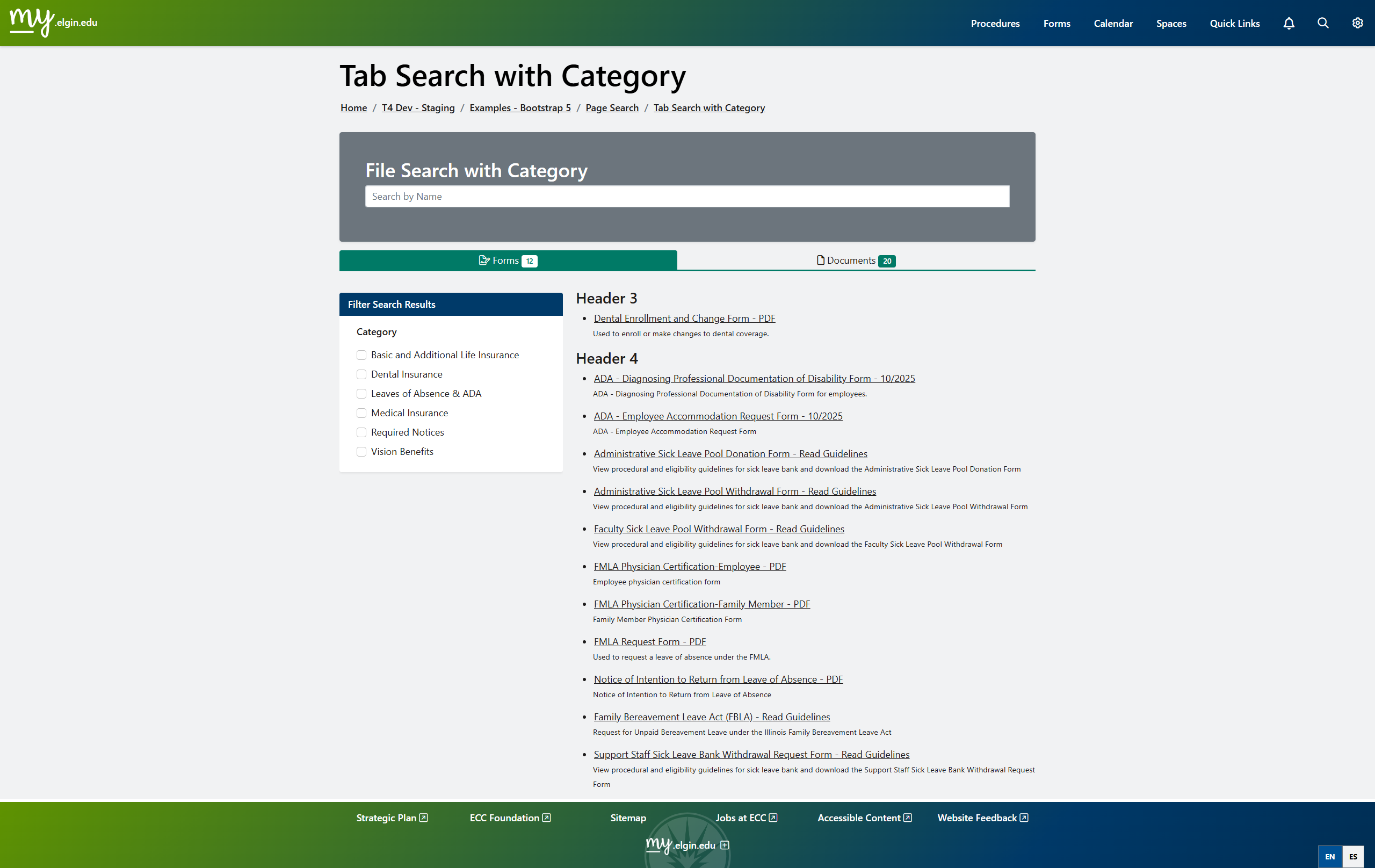
Intranet – Tab Search with Category
File + form search UI • Category filters and tabs
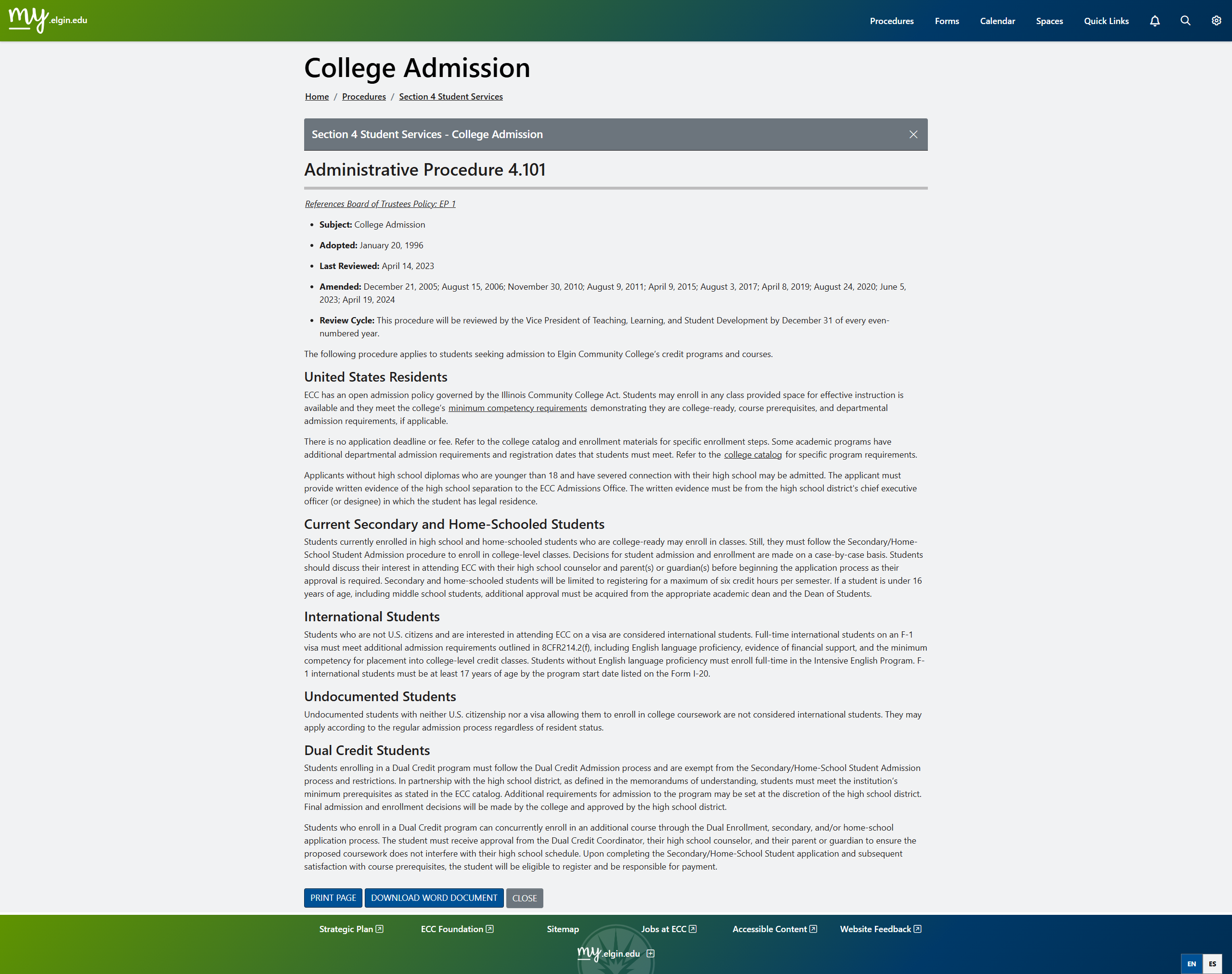
Intranet – Procedures Layout
Readable procedure template • Print & Word export UI
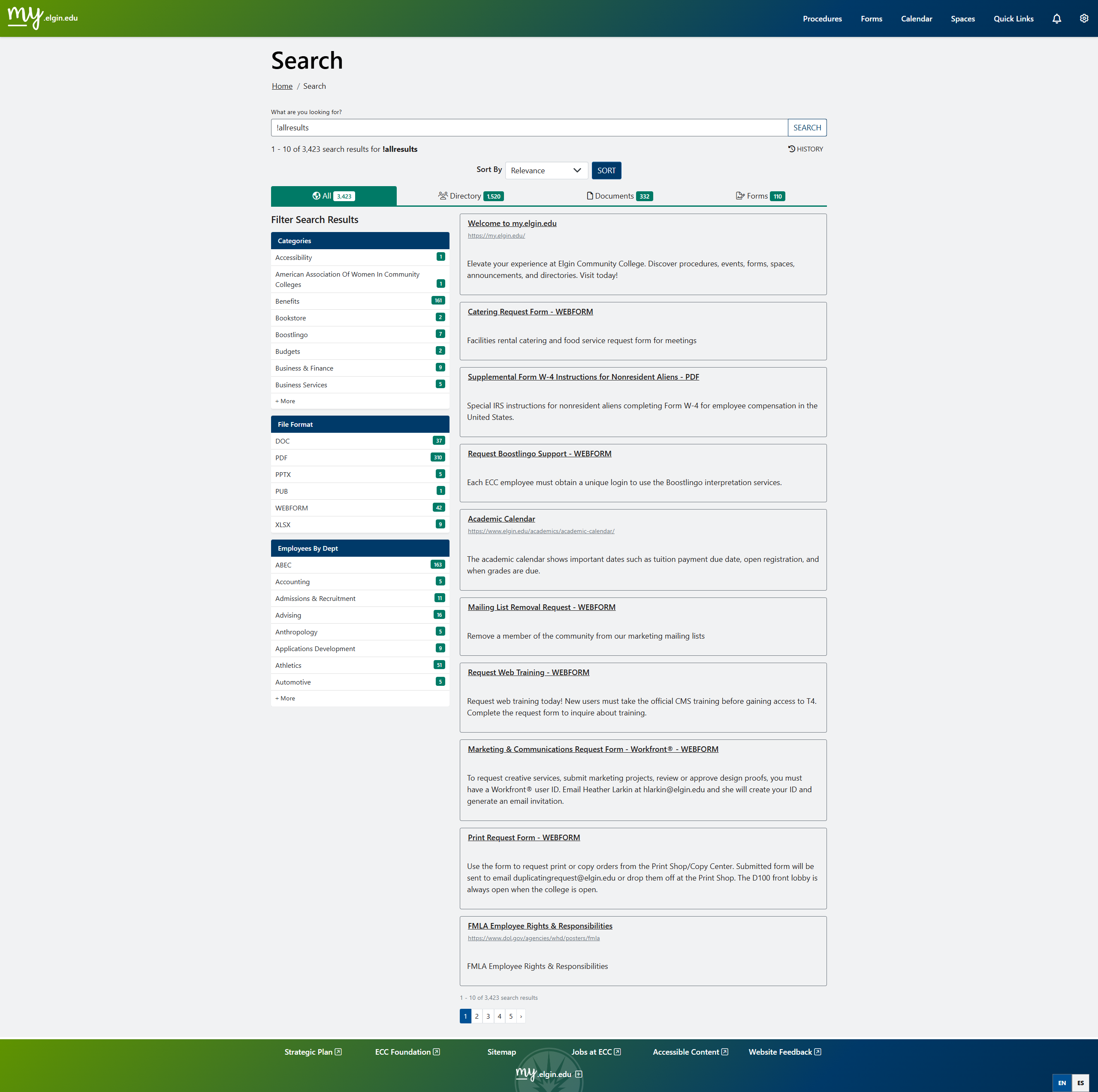
Intranet – Global Search
Faceted search UI • Directory, documents, and forms
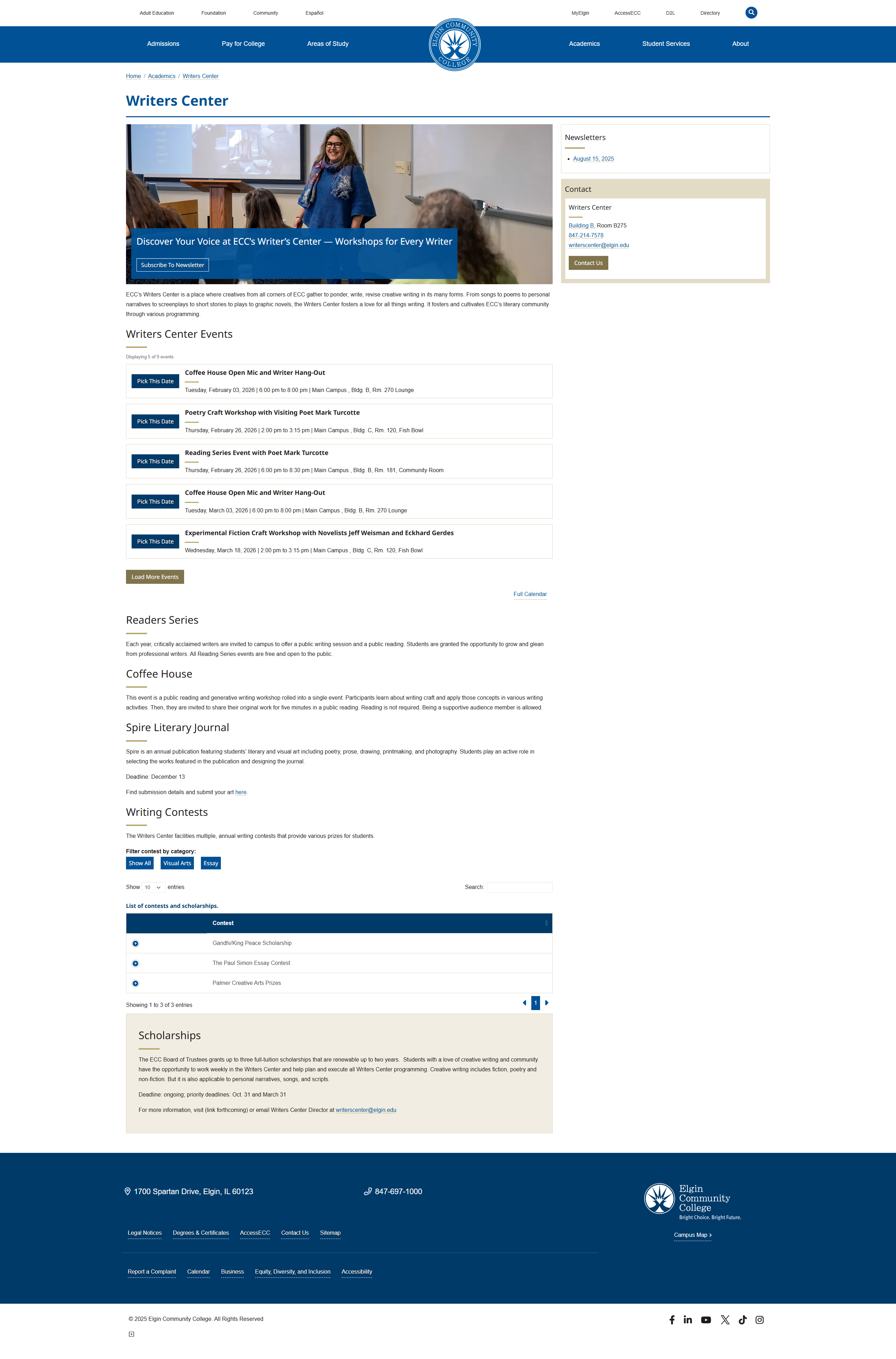
Writers Center – Events & Datatable
Landing page UI • Calendar widget + data tables
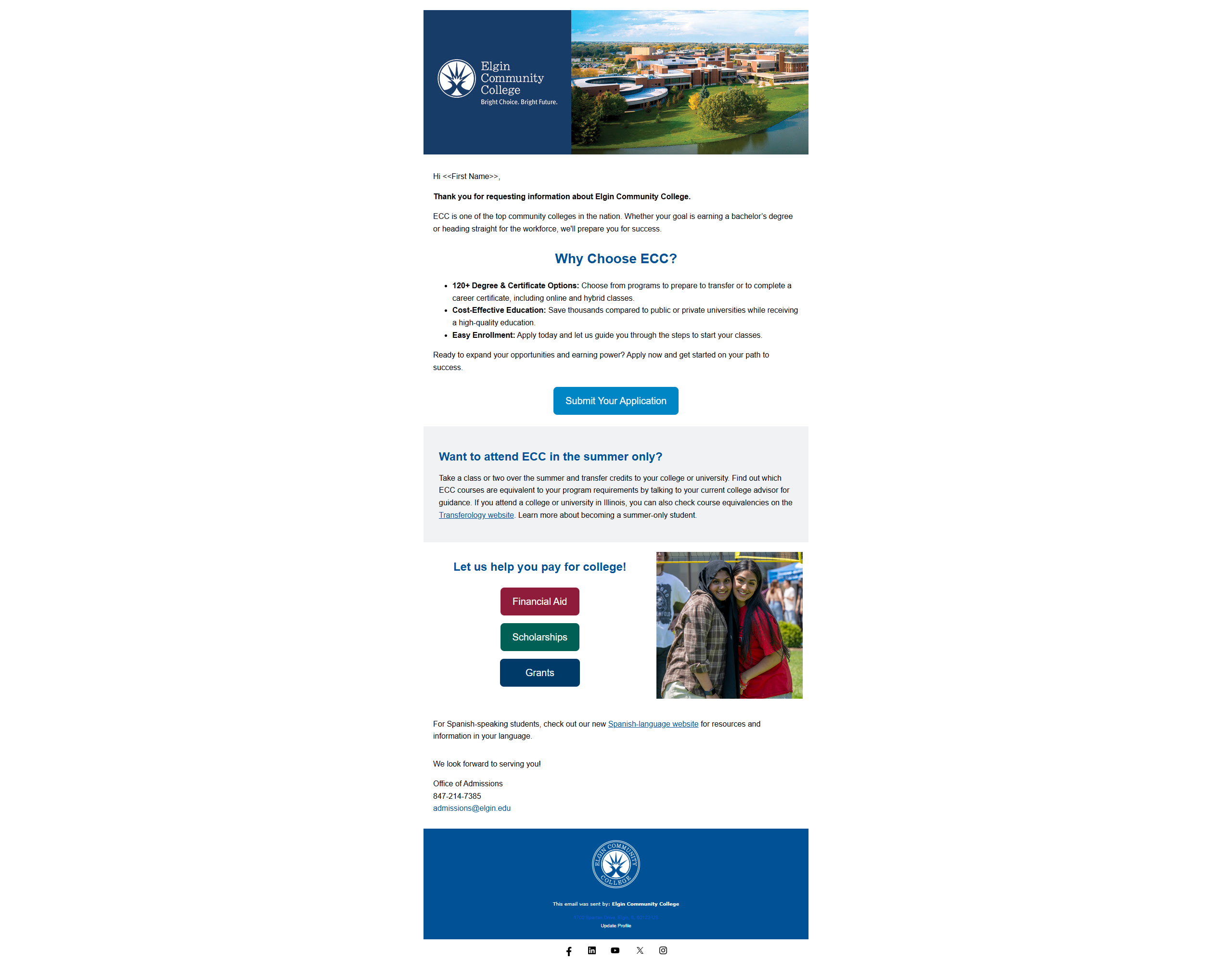
Salesforce Marketing Email Template
Responsive email design • Salesforce Marketing Cloud